URLConnection
类图:
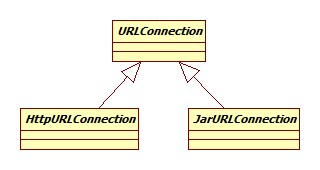
我们以urlconnection包的简单对百度首页的读取来开启我们的源码阅读旅程。
连接建立
相关源码:
1//http://www.baidu.com
2URL realUrl = new URL(urlName);
3URLConnection conn = realUrl.openConnection();
4conn.setRequestProperty("accept", "*/*");
5conn.setRequestProperty("connection", "Keep-Alive");
6conn.setRequestProperty("user-agent", "Mozilla/4.0 (compatible; MSIE 6.0; Windows NT 5.1; SV1)");
7// 建立实际的连接
8conn.connect();
URL构建
URL负责协议的解析以及相应的协议处理器的创建,协议解析的过程其实就是一个字符串的处理过程。协议处理器即URLStreamHandler,类图:
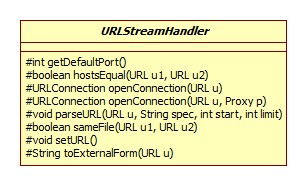
其子类如下图所示:
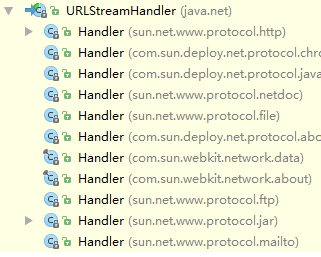
每种协议的处理器便在sun.net.www.protocol.xxx中,URL获取处理器就是一个手动拼接类名,用反射生成实例的过程。
创建连接对象
URL.openConnection:
1public URLConnection openConnection() {
2    return handler.openConnection(this);
3}
注意此处并未执行真正的连接操作,从上一节可以看出,这里的Handler应该是sun.net.www.protocol.http.Handler:
1protected java.net.URLConnection openConnection(URL u, Proxy p) {
2    //p为空
3    return new HttpURLConnection(u, p, this);
4}
这里的HttpURLConnection同样位于sun.net.www.protocol.http包下,构造器源码:
 1protected HttpURLConnection(URL u, Proxy p, Handler handler) {
 2    super(u);
 3    requests = new MessageHeader();
 4    responses = new MessageHeader();
 5    userHeaders = new MessageHeader();
 6    this.handler = handler;
 7    instProxy = p;
 8    if (instProxy instanceof sun.net.ApplicationProxy) {
 9        /* Application set Proxies should not have access to cookies
10         * in a secure environment unless explicitly allowed. */
11        try {
12            cookieHandler = CookieHandler.getDefault();
13        } catch (SecurityException se) { /* swallow exception */ }
14    } else {
15        cookieHandler = java.security.AccessController.doPrivileged(
16            new java.security.PrivilegedAction<CookieHandler>() {
17            public CookieHandler run() {
18                return CookieHandler.getDefault();
19            }
20        });
21    }
22    cacheHandler = java.security.AccessController.doPrivileged(
23        new java.security.PrivilegedAction<ResponseCache>() {
24            public ResponseCache run() {
25            return ResponseCache.getDefault();
26        }
27    });
28}
消息头
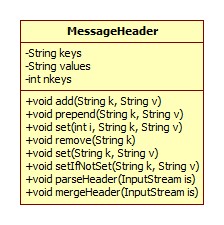
可以看出,这里使用MessageHeader作为请求响应头的保存,解析载体,其类图:
Cookie处理器
CookieHandler实现了Cookie语义,类图:
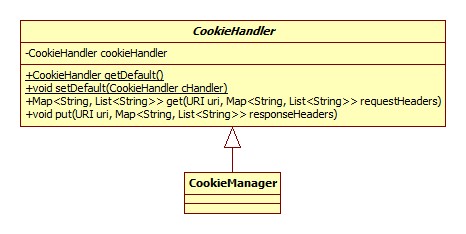
不过因为默认并没有默认的CookieHandler可用,所以构造器里的cookieHandler为null。
缓存
ResponseCache实现了缓存的语义,类图:
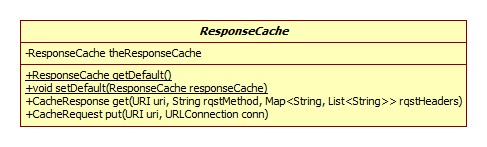
cacheHandler属性同样为空。
请求头设置
URLConnection.setRequestProperty:
1public void setRequestProperty(String key, String value) {
2    if (connected)
3        throw new IllegalStateException("Already connected");
4    if (key == null)
5        throw new NullPointerException ("key is null");
6    if (requests == null)
7        requests = new MessageHeader();
8    requests.set(key, value);
9}
很明显是委托给MessageHeader实现的,从其类图可以看出,MessageHeader内部其实由key和value数组组成,这里的添加便是有则更新,没有则添加的过程。
连接
连接的过程为创建一个HttpClient对象,在其构造器中完成连接,类图:
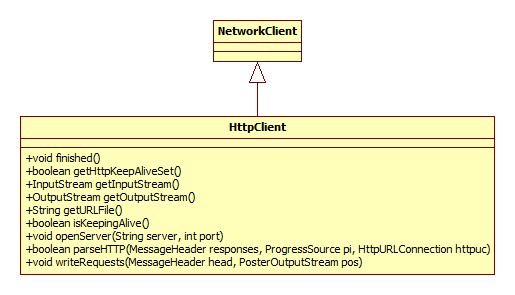
HttpClient由HttpURLConnection的getNewHttpClient完成构造:
1protected HttpClient getNewHttpClient(URL url, Proxy p, int connectTimeout)  {
2    return HttpClient.New(url, p, connectTimeout, this);
3}
如果没有设置代理,那么p自然是空的,connectTimeout默认为-1,即永不超时。HttpClient构造器源码:
 1protected HttpClient(URL url, Proxy p, int to) {
 2    proxy = (p == null) ? Proxy.NO_PROXY : p;
 3    this.host = url.getHost();
 4    this.url = url;
 5    port = url.getPort();
 6    if (port == -1) {
 7        //默认就是80
 8        port = getDefaultPort();
 9    }
10    setConnectTimeout(to);
11    capture = HttpCapture.getCapture(url);
12    openServer();
13}
openServer方法实现:
 1@Override
 2public void openServer(String server, int port) throws IOException {
 3    serverSocket = doConnect(server, port);
 4    try {
 5        OutputStream out = serverSocket.getOutputStream();
 6        if (capture != null) {
 7            out = new HttpCaptureOutputStream(out, capture);
 8        }
 9        serverOutput = new PrintStream(new BufferedOutputStream(out),false, encoding);
10    } catch (UnsupportedEncodingException e) {
11        throw new InternalError(encoding+" encoding not found", e);
12    }
13    serverSocket.setTcpNoDelay(true);
14}
doConnect方法所做的便是建立Socket连接,如果设置启用网络抓包,那么将SocketOutputStream包装为HttpCaptureOutputStream,什么是Java的抓包呢?
其实就是将URLConnectiont通信的请求和相应原封不动的保存到文件中。抓包通过VM参数-Dsun.net.http.captureRules=data/capture.rules启用,参数指向的是一个规则文件,每条规则占据一行,规则示例 :
1www\.baidu\.com , baidu%d.log
表示对域名baidu.com进行抓包,抓到的包保存在工程下的格式为baidu%d.log的文件中。
Java中用类HttpCapture解析,存储抓包规则,类图:
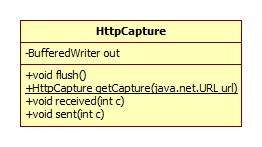
HttpClient构造器中的:
1capture = HttpCapture.getCapture(url);
便用于检测是否适用于当前域名的规则:
 1  public static HttpCapture getCapture(java.net.URL url) {
 2    //读取sun.net.http.captureRules指向的文件并解析
 3    if (!isInitialized()) {
 4        init();
 5    }
 6    if (patterns == null || patterns.isEmpty()) {
 7        return null;
 8    }
 9    String s = url.toString();
10    for (int i = 0; i < patterns.size(); i++) {
11        Pattern p = patterns.get(i);
12        if (p.matcher(s).find()) {
13            String f = capFiles.get(i);
14            File fi;
15            if (f.indexOf("%d") >= 0) {
16                java.util.Random rand = new java.util.Random();
17                do {
18                    //用随机数替代%d
19                    String f2 = f.replace("%d", Integer.toString(rand.nextInt()));
20                    fi = new File(f2);
21                } while (fi.exists());
22            } else {
23                fi = new File(f);
24            }
25            return new HttpCapture(fi, url);
26        }
27    }
28    return null;
29}
HttpCaptureOutputStream继承自io包的FilterOutputStream,作用很简单,就是将发送的每一个字节转发给HttpCapture,由后者完成到文件的写入。
PrintStream
输出流最终被包装成了PrintStream,此类在io包并未进行说明。类图:
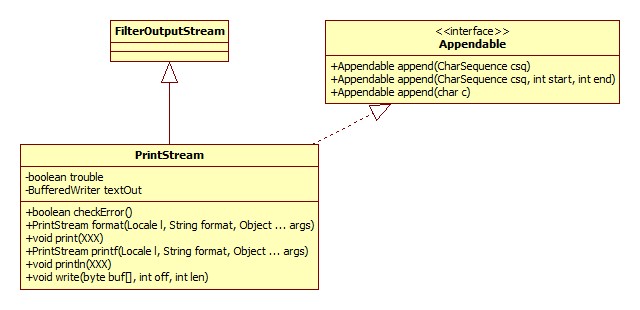
此类的特点可总结如下:
-
如果写入出错,并不会抛出异常,而是将内部的trouble属性设为true,我们可以通过checkError方法进行检测是否出错。
-
从类图中可以看出,虽然这是一个输出流,但却是用Writer实现的!此类对要写入的数据进行了平台相关的编码工作,最终写出的其实是字符!之所以这么实现需要结合JDK的历史(jdk1.0加入)进行考量,那时候还没有Writer接口(jdk1.1加入,正是为了修正这个逻辑问题),这也是为什么System.out是个PrintStream。
关于其写的是字符这一点可从源码中得到证明:
1public void print(int i) { 2 write(String.valueOf(i)); 3} -
自动刷新特性:
- 当println方法被调用。
- autoFlush设为true时,如果检测到字符串中含有'\n',刷新。
- autoFlush设为true时,write(String str)方法也会导致刷新。
PrintWriter和PrintStream的实现方式以及API几乎完全一致,除了不会自动检测换行符并刷新。关于两者的黑历史参考:
请求发送
当与远程URL的连接建立后并不会马上发送请求,而是等到需要获取响应时。我们以获取全部响应头为例,sun.net.www.protocol.http.HttpURLConnection.getHeaderFields:
1@Override
2public Map<String, List<String>> getHeaderFields() {
3    try {
4        getInputStream();
5    } catch (IOException e) {}
6    return getFilteredHeaderFields();
7}
getInputStream方法调用了写请求writeRequests方法。最终实现位于HttpClient.writeRequests:
1public void writeRequests(MessageHeader head,PosterOutputStream pos) {
2    requests = head;
3    requests.print(serverOutput);
4    serverOutput.flush();
5}
MessageHeader.print:
1public synchronized void print(PrintStream p) {
2    for (int i = 0; i < nkeys; i++)
3        if (keys[i] != null) {
4            p.print(keys[i] +
5                (values[i] != null ? ": "+values[i]: "") + "\r\n");
6        }
7    p.print("\r\n");
8    p.flush();
9}
一目了然。
响应解析
其实就是获得输入流逐行解析的过程,不再向下展开。
DNS解析
触发DNS解析的时机是HttpClient的New方法,默认的实现是Inet4AddressImpl的lookupAllHostAddr方法:
1public native InetAddress[]
2        lookupAllHostAddr(String hostname) throws UnknownHostException;
native实现其实调用的是Linux的getaddrinfo系统调用,当然JDK在java层面也有对解析结果的缓存。
如何查看Linux的DNS服务器地址呢?
-
配置文件
1cat /etc/resolv.conf结果如下:
1nameserver 10.0.0.2 -
nslookup:
1nslookup baidu.com结果:
1Server:		10.0.0.2
2Address:	10.0.0.2#53
3
4Non-authoritative answer:
5Name:	baidu.com
6Address: 220.181.57.216
7Name:	baidu.com
8Address: 123.125.115.110
所以DNS便是10.0.0.2
keep-alive
在创建连接时,源码位于sun.net.www.http.New方法,省略版本:
1public static HttpClient New(URL url, Proxy p, int to, boolean useCache,
2        HttpURLConnection httpuc) throws IOException {
3    HttpClient ret = null;
4    /* see if one's already around */
5    if (useCache) {
6        ret = kac.get(url, null);
7    }
8    // ...
9}
kac是connection的缓存,定义在HttpClient类中:
1/* where we cache currently open, persistent connections */
2protected static KeepAliveCache kac = new KeepAliveCache();
KeepAliveCache的定义如下:
 1/**
 2 * A class that implements a cache of idle Http connections for keep-alive
 3 *
 4 * @author Stephen R. Pietrowicz (NCSA)
 5 * @author Dave Brown
 6 */
 7public class KeepAliveCache
 8    extends HashMap<KeepAliveKey, ClientVector>
 9    implements Runnable {
10
11    static final int MAX_CONNECTIONS = 5;
12    static int result = -1;
13    static int getMaxConnections() {
14        if (result == -1) {
15            result = AccessController.doPrivileged(
16                new GetIntegerAction("http.maxConnections", MAX_CONNECTIONS))
17                .intValue();
18            if (result <= 0) {
19                result = MAX_CONNECTIONS;
20            }
21        }
22        return result;
23    }
24
25}
getMaxConnections指的是能够缓存的最大的连接数,如果不指定,默认是5. 那么缓存的链接的有效期是多少呢?
在KeepAliveCache内有一个静态变量:
1static final int LIFETIME = 5000;
这个是过期检查线程运行的时间间隔(毫秒)。此线程初始化:
1AccessController.doPrivileged(new PrivilegedAction<>() {
2	public Void run() {
3		keepAliveTimer = InnocuousThread.newSystemThread("Keep-Alive-Timer", cache);
4		keepAliveTimer.setDaemon(true);
5		keepAliveTimer.setPriority(Thread.MAX_PRIORITY - 2);
6		keepAliveTimer.start();
7		return null;
8	}
9});
运行的核心逻辑:
 1@Override
 2public void run() {
 3	do {
 4		try {
 5			Thread.sleep(LIFETIME);
 6		} catch (InterruptedException e) {}
 7
 8		// Remove all outdated HttpClients.
 9		synchronized (this) {
10			long currentTime = System.currentTimeMillis();
11			List<KeepAliveKey> keysToRemove = new ArrayList<>();
12
13			for (KeepAliveKey key : keySet()) {
14				ClientVector v = get(key);
15				synchronized (v) {
16					KeepAliveEntry e = v.peek();
17					while (e != null) {
18						if ((currentTime - e.idleStartTime) > v.nap) {
19							v.poll();
20							e.hc.closeServer();
21						} else {
22							break;
23						}
24						e = v.peek();
25					}
26
27					if (v.isEmpty()) {
28						keysToRemove.add(key);
29					}
30				}
31			}
32
33			for (KeepAliveKey key : keysToRemove) {
34				removeVector(key);
35			}
36		}
37	} while (!isEmpty());
38}
一个缓存的连接的有效期在KeepAliveCache.put时确定:
 1/**
 2 * Register this URL and HttpClient (that supports keep-alive) with the cache
 3 * @param url  The URL contains info about the host and port
 4 * @param http The HttpClient to be cached
 5 */
 6public synchronized void put(final URL url, Object obj, HttpClient http) {
 7    if (v == null) {
 8        int keepAliveTimeout = http.getKeepAliveTimeout();
 9        v = new ClientVector(keepAliveTimeout > 0 ?
10                             keepAliveTimeout * 1000 : LIFETIME);
11        v.put(http);
12        super.put(key, v);
13    } else {
14        v.put(http);
15    }
16}
http.getKeepAliveTimeout()取的实际上是环境变量http.keepAlive的值。
最后还有一个问题,连接是在什么时机被放进缓存的?
在HttpURLConnection场景下是其getInputStream方法。