09.08 Theano 实例:线性回归
Theano 实例:线性回归
基本模型
在用 theano 进行线性回归之前,先回顾一下 theano 的运行模式。
theano 是一个符号计算的数学库,一个基本的 theano 结构大致如下:
- 定义符号变量
- 编译用符号变量定义的函数,使它能够用这些符号进行数值计算。
- 将函数应用到数据上去
1%matplotlib inline
2from matplotlib import pyplot as plt
3import numpy as np
4import theano
5from theano import tensor as T
Using gpu device 0: GeForce GTX 850M
简单的例子:$y = a \times b, a, b \in \mathbb{R}$
定义 $a, b, y$:
1a = T.scalar()
2b = T.scalar()
3
4y = a * b
编译函数:
1multiply = theano.function(inputs=[a, b], outputs=y)
将函数运用到数据上:
1print multiply(3, 2) # 6
2print multiply(4, 5) # 20
6.0
20.0
线性回归
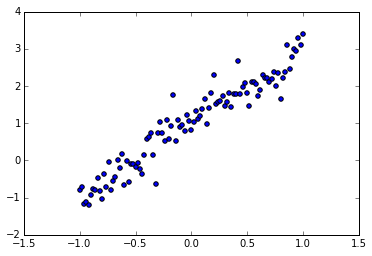
回到线性回归的模型,假设我们有这样的一组数据:
1train_X = np.linspace(-1, 1, 101)
2train_Y = 2 * train_X + 1 + np.random.randn(train_X.size) * 0.33
分布如图:
1plt.scatter(train_X, train_Y)
2plt.show()
定义符号变量
我们使用线性回归的模型对其进行模拟: $$\bar{y} = wx + b$$
首先我们定义 $x, y$:
1X = T.scalar()
2Y = T.scalar()
可以在定义时候直接给变量命名,也可以之后修改变量的名字:
1X.name = 'x'
2Y.name = 'y'
我们的模型为:
1def model(X, w, b):
2    return X * w + b
在这里我们希望模型得到 $\bar{y}$ 与真实的 $y$ 越接近越好,常用的平方损失函数如下: $$C = |\bar{y}-y|^2$$
有了损失函数,我们就可以使用梯度下降法来迭代参数 $w, b$ 的值,为此,我们将 $w$ 和 $b$ 设成共享变量:
1w = theano.shared(np.asarray(0., dtype=theano.config.floatX))
2w.name = 'w'
3b = theano.shared(np.asarray(0., dtype=theano.config.floatX))
4b.name = 'b'
定义 $\bar y$:
1Y_bar = model(X, w, b)
2
3theano.pp(Y_bar)
'((x * HostFromGpu(w)) + HostFromGpu(b))'
损失函数及其梯度:
1cost = T.mean(T.sqr(Y_bar - Y))
2grads = T.grad(cost=cost, wrt=[w, b])
定义梯度下降规则:
1lr = 0.01
2updates = [[w, w - grads[0] * lr],
3           [b, b - grads[1] * lr]]
编译训练模型
每运行一次,参数 $w, b$ 的值就更新一次:
1train_model = theano.function(inputs=[X,Y],
2                              outputs=cost,
3                              updates=updates,
4                              allow_input_downcast=True)
将训练函数应用到数据上
训练模型,迭代 100 次:
1for i in xrange(100):
2    for x, y in zip(train_X, train_Y):
3        train_model(x, y)
显示结果:
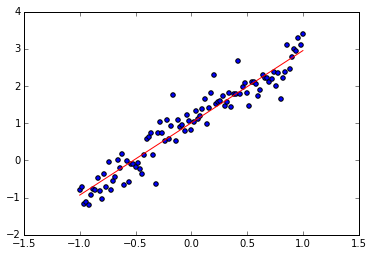
1print w.get_value()  # 接近 2
2print b.get_value()  # 接近 1
3
4plt.scatter(train_X, train_Y)
5plt.plot(train_X, w.get_value() * train_X + b.get_value(), 'r')
6
7plt.show()
1.94257426262
1.00938093662