08.11 接口
接口
在 Python 中,鸭子类型(duck typing)是一种动态类型的风格。所谓鸭子类型,来自于 James Whitcomb Riley 的“鸭子测试”:
当看到一只鸟走起来像鸭子、游泳起来像鸭子、叫起来也像鸭子,那么这只鸟就可以被称为鸭子。
假设我们需要定义一个函数,这个函数使用一个类型为鸭子的参数,并调用它的走和叫方法。
在鸭子类型的语言中,这样的函数可以接受任何类型的对象,只要这个对象实现了走和叫的方法,否则就引发一个运行时错误。换句话说,任何拥有走和叫方法的参数都是合法的。
先看一个例子,父类:
1class Leaf(object):
2    def __init__(self, color="green"):
3        self.color = color
4    def fall(self):
5        print "Splat!"
子类:
1class MapleLeaf(Leaf):
2    def fall(self):
3        self.color = 'brown'
4        super(MapleLeaf, self).fall()
新的类:
1class Acorn(object):
2    def fall(self):
3        print "Plunk!"
这三个类都实现了 fall() 方法,因此可以这样使用:
1objects = [Leaf(), MapleLeaf(), Acorn()]
2
3for obj in objects:
4    obj.fall()
Splat!
Splat!
Plunk!
这里 fall() 方法就一种鸭子类型的体现。
不仅方法可以用鸭子类型,属性也可以:
  1import numpy as np
  2from scipy.ndimage.measurements import label
  3
  4class Forest(object):
  5    """ Forest can grow trees which eventually die."""
  6    def __init__(self, size=(150,150), p_sapling=0.0025):
  7        self.size = size
  8        self.trees = np.zeros(self.size, dtype=bool)
  9        self.p_sapling = p_sapling
 10
 11    def __repr__(self):
 12        my_repr = "{}(size={})".format(self.__class__.__name__, self.size)
 13        return my_repr
 14
 15    def __str__(self):
 16        return self.__class__.__name__
 17
 18    @property
 19    def num_cells(self):
 20        """Number of cells available for growing trees"""
 21        return np.prod(self.size)
 22
 23    @property
 24    def losses(self):
 25        return np.zeros(self.size)
 26
 27    @property
 28    def tree_fraction(self):
 29        """
 30        Fraction of trees
 31        """
 32        num_trees = self.trees.sum()
 33        return float(num_trees) / self.num_cells
 34
 35    def _rand_bool(self, p):
 36        """
 37        Random boolean distributed according to p, less than p will be True
 38        """
 39        return np.random.uniform(size=self.trees.shape) < p
 40
 41    def grow_trees(self):
 42        """
 43        Growing trees.
 44        """
 45        growth_sites = self._rand_bool(self.p_sapling)
 46        self.trees[growth_sites] = True
 47
 48    def advance_one_step(self):
 49        """
 50        Advance one step
 51        """
 52        self.grow_trees()
 53
 54class BurnableForest(Forest):
 55    """
 56    Burnable forest support fires
 57    """
 58    def __init__(self, p_lightning=5.0e-6, **kwargs):
 59        super(BurnableForest, self).__init__(**kwargs)
 60        self.p_lightning = p_lightning
 61        self.fires = np.zeros((self.size), dtype=bool)
 62
 63    def advance_one_step(self):
 64        """
 65        Advance one step
 66        """
 67        super(BurnableForest, self).advance_one_step()
 68        self.start_fires()
 69        self.burn_trees()
 70
 71    @property
 72    def losses(self):
 73        return self.fires
 74
 75    @property
 76    def fire_fraction(self):
 77        """
 78        Fraction of fires
 79        """
 80        num_fires = self.fires.sum()
 81        return float(num_fires) / self.num_cells
 82
 83    def start_fires(self):
 84        """
 85        Start of fire.
 86        """
 87        lightning_strikes = (self._rand_bool(self.p_lightning) &
 88            self.trees)
 89        self.fires[lightning_strikes] = True
 90
 91    def burn_trees(self):
 92        pass
 93
 94class SlowBurnForest(BurnableForest):
 95    def burn_trees(self):
 96        """
 97        Burn trees.
 98        """
 99        fires = np.zeros((self.size[0] + 2, self.size[1] + 2), dtype=bool)
100        fires[1:-1, 1:-1] = self.fires
101        north = fires[:-2, 1:-1]
102        south = fires[2:, 1:-1]
103        east = fires[1:-1, :-2]
104        west = fires[1:-1, 2:]
105        new_fires = (north | south | east | west) & self.trees
106        self.trees[self.fires] = False
107        self.fires = new_fires
108
109class InstantBurnForest(BurnableForest):
110    def burn_trees(self):
111        # 起火点
112        strikes = self.fires
113        # 找到连通区域
114        groves, num_groves = label(self.trees)
115        fires = set(groves[strikes])
116        self.fires.fill(False)
117        # 将与着火点相连的区域都烧掉
118        for fire in fires:
119            self.fires[groves == fire] = True
120        self.trees[self.fires] = False
121        self.fires.fill(False)
测试:
 1forest = Forest()
 2b_forest = BurnableForest()
 3sb_forest = SlowBurnForest()
 4ib_forest = InstantBurnForest()
 5
 6forests = [forest, b_forest, sb_forest, ib_forest]
 7
 8losses_history = []
 9
10for i in xrange(1500):
11    for fst in forests:
12        fst.advance_one_step()
13    losses_history.append(tuple(fst.losses.sum() for fst in forests))
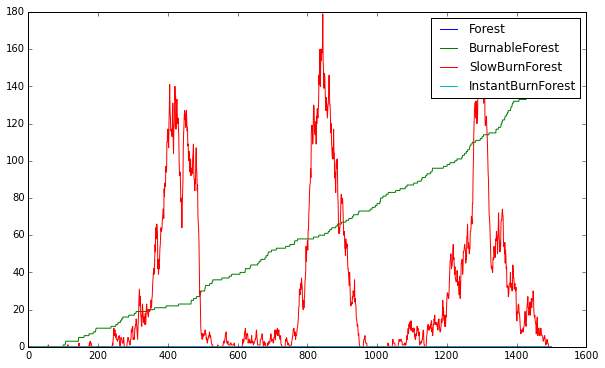
显示结果:
1import matplotlib.pyplot as plt
2%matplotlib inline
3
4plt.figure(figsize=(10,6))
5
6plt.plot(losses_history)
7plt.legend([f.__str__() for f in forests])
8
9plt.show()